
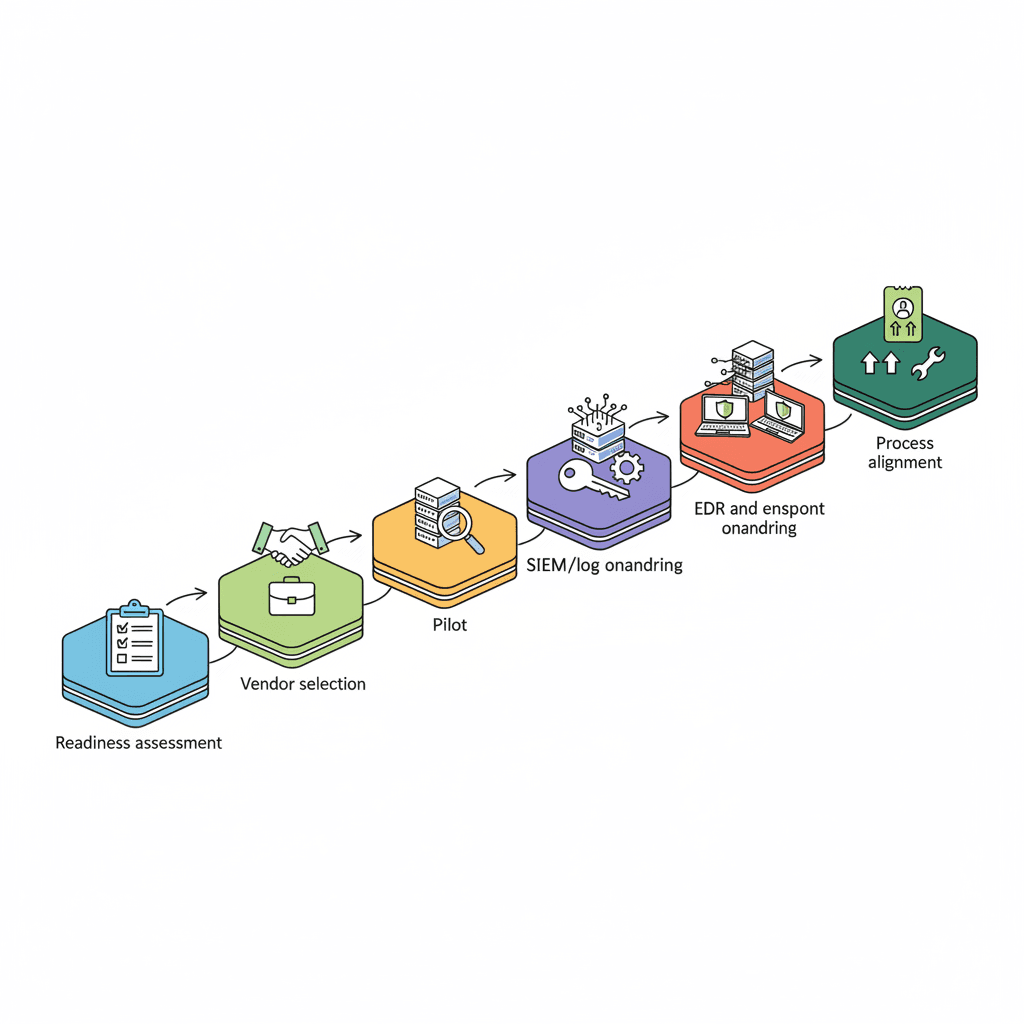
What does it mean to implement co-managed IT for a regulated small or midsize business in New Jersey or New York?
Implementing co-managed IT means splitting operational responsibilities between your internal IT team and an external provider so you keep control of core systems while gaining 24/7 monitoring, senior-engineer support, and security scale. The goal is clear roles, measurable SLAs, and a documented onboarding path that meets NY and NJ regulator expectations.
Start by mapping your assets, compliance obligations, and internal capabilities, then choose an MSP or MSSP that can integrate with your tools and meet state-specific requirements such as NYDFS guidance and New Jersey breach notification rules. This article walks through a complete, practical co-managed IT implementation checklist with examples, templates, and repeatable artifacts you can copy into procurement documents and runbooks.
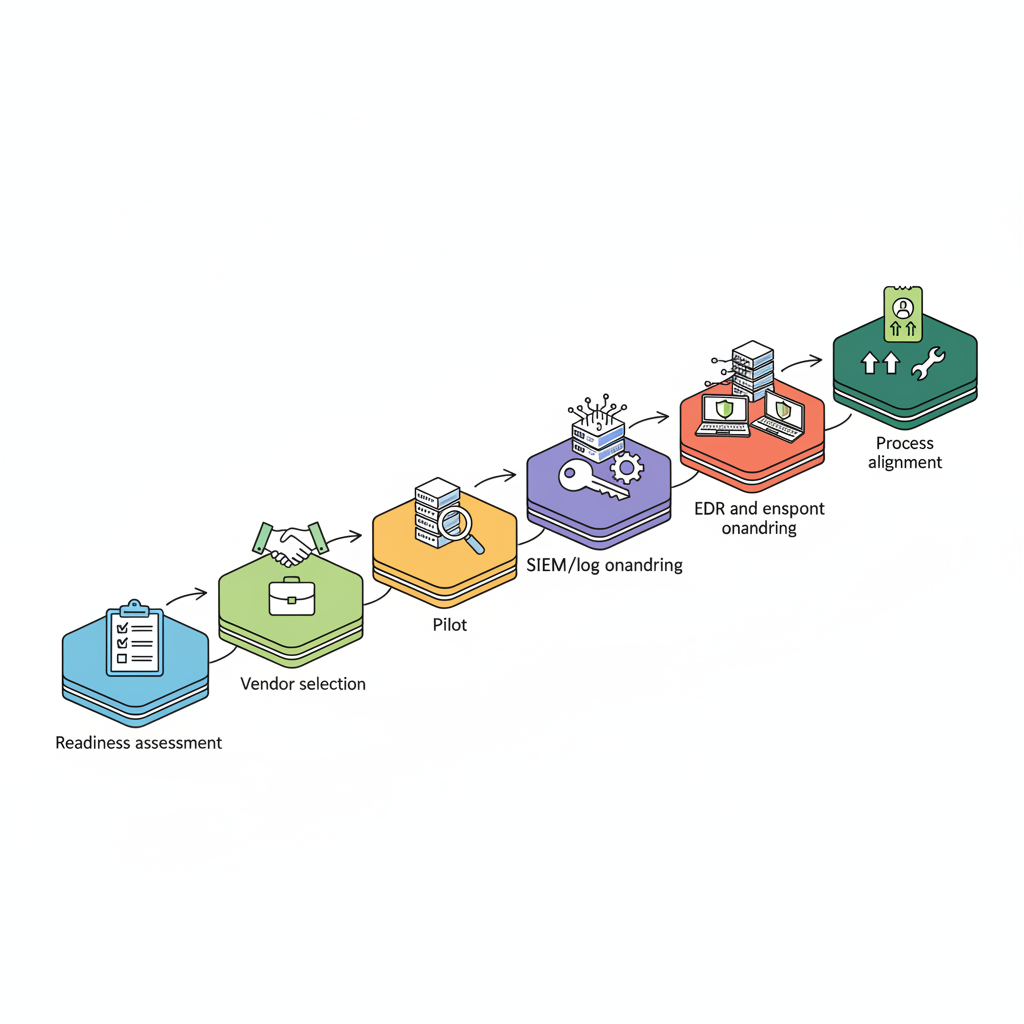
Quick overview: why follow a structured implementation plan
If you plan to implement co-managed IT, a structured plan prevents role confusion, security gaps, and audit failures. Without documented scope, you risk overlapping duties (who patches what?) and missed regulator timelines for breach reporting in NY and NJ.
A structured plan clarifies operational ownership, defines the minimum viable co-management state, and sets measurable targets for response and containment. For example, target a detection-to-containment workflow that lets your team and the MSP reduce dwell time during incidents: document detection, escalation, containment, and evidence preservation steps before you go live.
Actionable takeaway: create a two-page scope summary that lists systems, responsibilities, and a 30/60/90-day milestone plan. That single artifact prevents the common failure where internal teams and the MSP both assume the other owns the same control.
Define responsibilities before tool onboarding; access without roles creates security debt.

Practical example: a finance firm in NJ kept endpoint control and delegated monitoring and incident response to its partner. They codified ownership in a one-page RACI and avoided a compliance finding during a later audit because evidence collection procedures were already agreed and tested.
Pre-engagement: internal readiness assessment (assets, policies, compliance gaps)
Begin any co-managed engagement with an internal readiness assessment that lists assets, policies, and compliance gaps. If you implement co-managed IT without this inventory, onboarding takes longer and contracts become contentious.
Step-by-step: first, run a fast asset inventory that covers servers, cloud tenants, on-prem network devices, endpoints, and critical SaaS applications. Use an automated discovery tool if available; otherwise, export active directory lists, cloud account inventories, and firewall configuration summaries. Second, map data flows and label where regulated data (PHI, PII, financial data) lives.
Then review your policies: incident response, access control, change control, and backup/DR. Note gaps versus known standards such as the NYDFS Cybersecurity Program Template and NIST SP 800-series controls. For NJ-regulated entities, include third-party questionnaire responses that the state recommends for vendors (see linked resource list).
Concrete artifact: produce a readiness summary with three sections: assets (spreadsheet), policy gaps (annotated list), and a compliance checklist with remediation priorities. Example remediation thresholds: apply MFA to all admin accounts before tool onboarding; require encrypted backups with point-in-time retention that meets your regulator's minimums.
Selecting the right MSP/MSSP — procurement checklist and red flags
Select an MSP or MSSP using a procurement checklist that tests technical fit, security posture, and local regulatory experience. A thin procurement process leads to poor integrations and SLA disputes later.
Procurement checklist (use during RFP review):
- Proof of 24/7 monitoring and senior-engineer escalation.
- Documentation of SIEM, EDR, and backup technologies they integrate with.
- References from NJ/NY regulated clients and a published incident response playbook.
- Template co-managed IT SLA and RACI for review (see SLA section later).
- Data handling and breach notification commitments aligned to NYDFS and NJ rules.
Red flags: refusal to sign a clear RACI, lack of written evidence-retention policies, or evasive answers on evidence collection and chain-of-custody for incidents. Also take note if the provider cannot explain how they handle hybrid IT deployment scenarios where some workloads stay on-prem and others run in cloud tenants.
Example clause to request: "Before go-live, confirm SIEM log retention meets regulatory minimums and that incident evidence collection procedures comply with NY/NJ regulator guidance." Ask for a named technical contact for onboarding and an example onboarding plan that lists tasks, tools, and responsibilities.
Pilot phase: scope, success metrics, and minimum viable co-management
Run a pilot that limits scope to 4–6 assets or one functional area to validate processes, tools, and escalation paths. A pilot reduces risk and reveals integration problems without exposing your whole environment.
Define success metrics before the pilot starts. Example KPIs: mean time to acknowledge alerts (target: internal baseline + MSP SLA), percent of critical patches applied within agreed window (target: 95% within SLA window), and accuracy of SIEM parsing for key log sources (target: 90% of expected event types mapped).
Minimum viable co-management (MVC) is the smallest set of capabilities that must work before broad rollout. For most regulated SMBs, MVC includes: EDR installed and reporting, SIEM ingestion for at least three critical log sources (firewall, domain controllers, and cloud auth logs), and a tested escalation path for confirmed incidents.
Decision rule for expansion: only expand after 30 days if MVC KPIs meet thresholds and the internal team signs off on knowledge-transfer artifacts. Use a pilot decision matrix (table below) to decide whether to scale or iterate.
| Metric | Pass threshold | Action if fail |
|---|---|---|
| EDR reporting | 100% of pilot endpoints reporting within 48 hours | Pause rollout, remediate installation or network blocking |
| SIEM ingestion | At least 3 critical sources mapped and parsed | Add connectors or normalize logs |
| Escalation test | Confirmed incident handled per RACI | Refine playbook and repeat test |
Technical onboarding: tools, access, credentials, monitoring, and SIEM integration
Technical onboarding turns paperwork into working telemetry and access. It makes co-managed IT real: that means installing agents, granting scoped access, configuring monitoring, and connecting logs to a central SIEM.
Onboarding steps (technical):
- Establish credentials and access model: create named service accounts, limit privileges using least-privilege policies, and record accounts in a shared vault.
- Deploy EDR agents to pilot endpoints and confirm they check in with the vendor console.
- Configure log forwarding: firewall syslog, domain controller logs, cloud auth logs, and backup logs into the SIEM.
- Validate alerting and tuning: run synthetic tests to ensure alerts route through the MSP incident queue and internal escalation path.
- Test evidence preservation: simulate an incident and verify log retention and forensic snapshots meet regulator expectations.
Specific example: for SIEM integration, map each log source to a use case (authentication failures, privilege elevation, data exfiltration), then create parsing rules and a suppression list to avoid noisy alerts. Aim to reduce false positives by 50% before wide rollout.
Limit initial access to named service accounts; broad admin keys create irreversible risk.
Quotable checklist line for compliance: "Before go-live, confirm SIEM log retention meets regulatory minimums and that incident evidence collection procedures comply with NY/NJ regulator guidance." Include the NYDFS template and NJ third-party vendor guidance as references during procurement and onboarding.
EDR & endpoint onboarding checklist
EDR onboarding should be scripted and auditable. A checklist prevents missed steps that create blind spots.
- Inventory endpoints and classify them (user, server, kiosk) before agent roll-out.
- Whitelist installer hashes and scheduling to avoid AV conflicts with other tools.
- Deploy agents in batches: pilot, staging, production.
- Confirm agent communications to the management console over allowed ports; record fallback procedures for offline endpoints.
- Set initial policy: block known malware, monitor suspicious behavior, and set alert level mapping to the co-managed IT SLA.
- Schedule a baseline scan and threat-hunting sweep with the MSSP partner within 7 days of deployment.
Concrete thresholds: ensure 100% of pilot endpoints report within 48 hours and that at least 95% of endpoints meet baseline policy compliance before wider rollout.
Log collection & SIEM mapping checklist
Log collection is the backbone of shared visibility. Map each source to an operational use case and retention requirement during onboarding.
- Identify required log sources and minimum retention per regulation.
- Confirm log formats and timestamps; normalize timezone handling.
- Create a SIEM mapping document: source → event types → alert rules → responsible party.
- Validate parsing by replaying sample logs and checking alert generation.
- Document retention settings and evidence export procedures for audits and investigations.
Example: map authentication failures from cloud IdP to high-priority alerts, and require 12 months of retention for authentication logs if your regulator expects that level of historical evidence. If exact retention requirements are unclear, refer to the NYDFS cybersecurity program template and NJ guidance for vendor data handling.
Process alignment: ticketing, escalation, change control, and patch management
Co-management fails when teams use different processes. Align ticketing, escalation paths, change control, and patching before you shift production duties.
Start by agreeing on a single ticketing system or a bi-directional integration so tickets never vanish between teams. Define severity levels and map those to response times in the co-managed IT SLA. For example, severity 1 incidents might require immediate paging to a named engineer and escalation to executive contacts for regulated clients.
Change control: require a joint change calendar, with emergency change procedures that document approvals and rollback plans. Patch management must include a shared policy: define which party approves critical vs. routine patches, acceptable maintenance windows, and metrics such as percent patched within 7 days for critical patches.
Include a clear escalation matrix in your RACI: list names, roles, contact methods, and secondary contacts. Test the matrix with a tabletop exercise during the pilot. That test will uncover communication gaps and help you tune SLA response times and escalation triggers.
Security & compliance controls to codify (MFA, least privilege, backup/DR plans)
Codify controls that auditors and regulators expect: multi-factor authentication, least-privilege access, and tested backup/disaster recovery plans. Co-managed setups often expose gaps if these controls are not written down and tested.
Actionable controls to codify now:
- MFA: require MFA on all admin and remote-access accounts and document allowed authenticator types.
- Least privilege: maintain a role catalog and a periodic access review schedule (e.g., quarterly).
- Backup/DR: document RTO and RPO targets for critical systems, encrypted backups, and a monthly restore test by the MSP and internal team.
Concrete artifact: a control matrix that lists control, responsible party, monitoring method, test frequency, and evidence location. For example: "Backups encrypted at rest — responsible: internal IT; monitored: backup tool reports; test frequency: monthly; evidence: backup test report in shared workspace."
Regulatory callout: include documented breach notification steps and SLAs that meet NY and NJ timelines; verify your co-management partner understands those requirements and will support evidence preservation and notification coordination as part of the incident response flow.
SLA and RACI templates: response times, escalation paths, and responsibilities
Draft a co-managed IT SLA and RACI that spells out response targets, handoffs, and responsibilities. Vague SLAs lead to finger-pointing during incidents.
SLA components to include:
- Response time by severity (acknowledgment and initial action).
- Resolution time objectives when feasible (or target containment times for security incidents).
- Escalation timelines and named contacts for each severity level.
- Reporting cadence and required content for monthly and incident reports.
RACI template (table):
| Activity | Responsible | Accountable | Consulted | Informed |
|---|---|---|---|---|
| EDR response | MSSP | Internal IT Director | Legal | Executives |
| Patch approval | Internal IT | Internal IT Director | MSSP | All users |
| SIEM tuning | MSSP | MSSP Technical Lead | Internal IT | Security Team |
Include SLA clauses for regulatory support: evidence export, forensic timelines, and cooperation for breach notifications. That alignment reduces delay during urgent investigations and ensures both parties meet co-managed IT SLA commitments.
Training, documentation, and knowledge transfer
Knowledge transfer is not a single meeting. Plan recurring training, an onboarding wiki, and shadowing sessions so your internal team understands the MSP's tools and workflows.
Practical training plan:
- Week 1: tooling overview and access review with named engineers.
- Week 2–4: shadowing on tickets, incident handling, and runbook execution.
- Month 2: a joint tabletop incident response exercise that includes legal and communications roles.
- Quarterly: refresher training and a review of tickets and incidents to capture lessons learned.
Documentation checklist: onboarding runbook, RACI, playbooks for critical incidents, backup/restore runbooks, and a central knowledge base with version control. Make evidence of training completion part of the monthly report so leadership sees progress and gaps.
Measuring success: KPIs, reporting cadence, and continuous improvement
Define KPIs that reflect operational health and compliance. Track them with a regular reporting cadence and run quarterly reviews to iterate on processes.
Recommended KPIs and targets (example set you can adopt):
- Mean time to acknowledge (by severity).
- Mean time to containment for security incidents.
- Patch compliance percentage within SLA windows.
- Number of actionable alerts per 1,000 endpoints (tuning quality measure).
- Backup successful restores per month.
Reporting cadence: weekly operational tickets summary, monthly KPI dashboard with trend lines, and quarterly joint reviews that include process improvement actions and roadmap items. Use the quarterly review to adjust SLAs, revise the co-managed IT implementation checklist, and prioritize tooling changes.
Common pitfalls and mitigation strategies
Most co-managed failures follow a pattern: unclear ownership, mismatched processes, insufficient access controls, and poor evidence collection. Address each with concrete mitigation steps.
Pitfall: overlapping responsibilities. Mitigation: a single RACI document with signatures from both parties.
Pitfall: noisy alerts and alert fatigue. Mitigation: allocate time during pilot for SIEM tuning and create a suppression and tuning log.
Pitfall: insufficient evidence for regulators. Mitigation: define retention, export, and chain-of-custody procedures during onboarding and test them with a simulated incident. For NY and NJ regulated firms, ensure the SIEM retention meets state expectations and have a named contact to support breach notification timelines.
Next steps — free IT assessment and pilot offer
To move from planning to execution, run a short readiness assessment that produces the two-page scope summary, a pilot plan, and a prioritized remediation list. Eighty Seven Solutions offers enterprise-grade IT and cybersecurity services and can help with assessments, pilot planning, and hybrid IT deployment scenarios.
Use these immediate next steps:
- Run the asset and policy readiness checklist from this guide and produce the three artifacts (asset spreadsheet, policy gap list, compliance checklist).
- Run a 30-day pilot focused on EDR and SIEM ingestion for 4–6 high-value assets using the pilot decision matrix above.
- Sign an interim RACI and SLA for the pilot that includes named contacts and evidence-preservation clauses.
See our services for details on managed IT and cybersecurity offerings, and use the site contact pages to schedule a free assessment: contact us, contact us, or contact us. You can also review a demo of technical capabilities at our services.