
Why a deployment checklist matters for hybrid & co‑managed environments
What is an edr deployment checklist hybrid co‑managed team needs? An EDR deployment checklist for hybrid & co‑managed IT documents decisions, owners, and test cases so teams deploy consistently across office, home, and contractor endpoints.
EDR (endpoint detection and response) is the endpoint agent, cloud console, and rule set that detects and helps contain endpoint threats. Co‑managed IT means your internal IT team and an external partner share operational responsibilities. For regulated NJ & NY firms, EDR deployments should document ownership and detection SLAs to meet NYDFS and HIPAA evidence requirements.
This checklist prevents common gaps: unclear escalation, missing telemetry for SIEM, untested rollback steps, and inconsistent agent configuration across macOS, Windows, and remote users. It also saves audit time for 23 NYCRR 500 and HIPAA reviews by producing a clear artifact trail.
Before you start — pre-deployment decisions
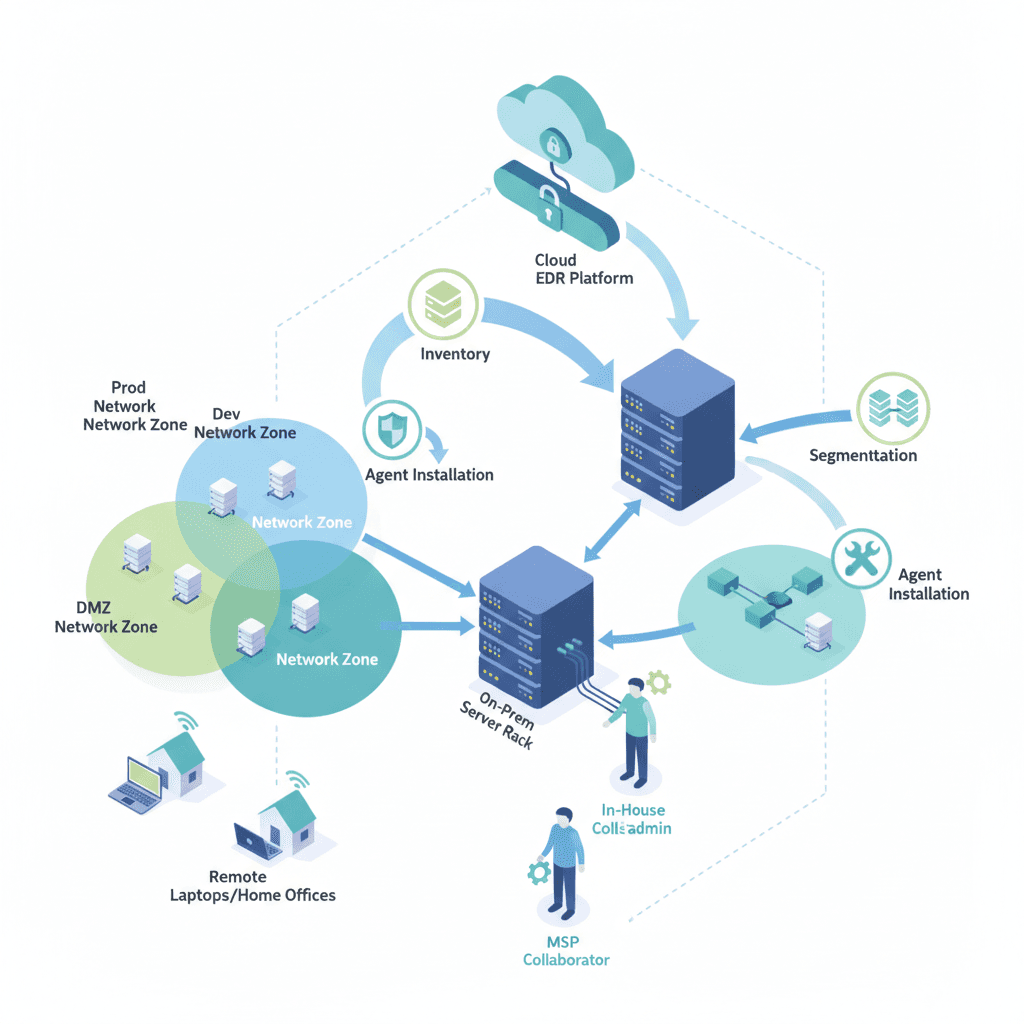
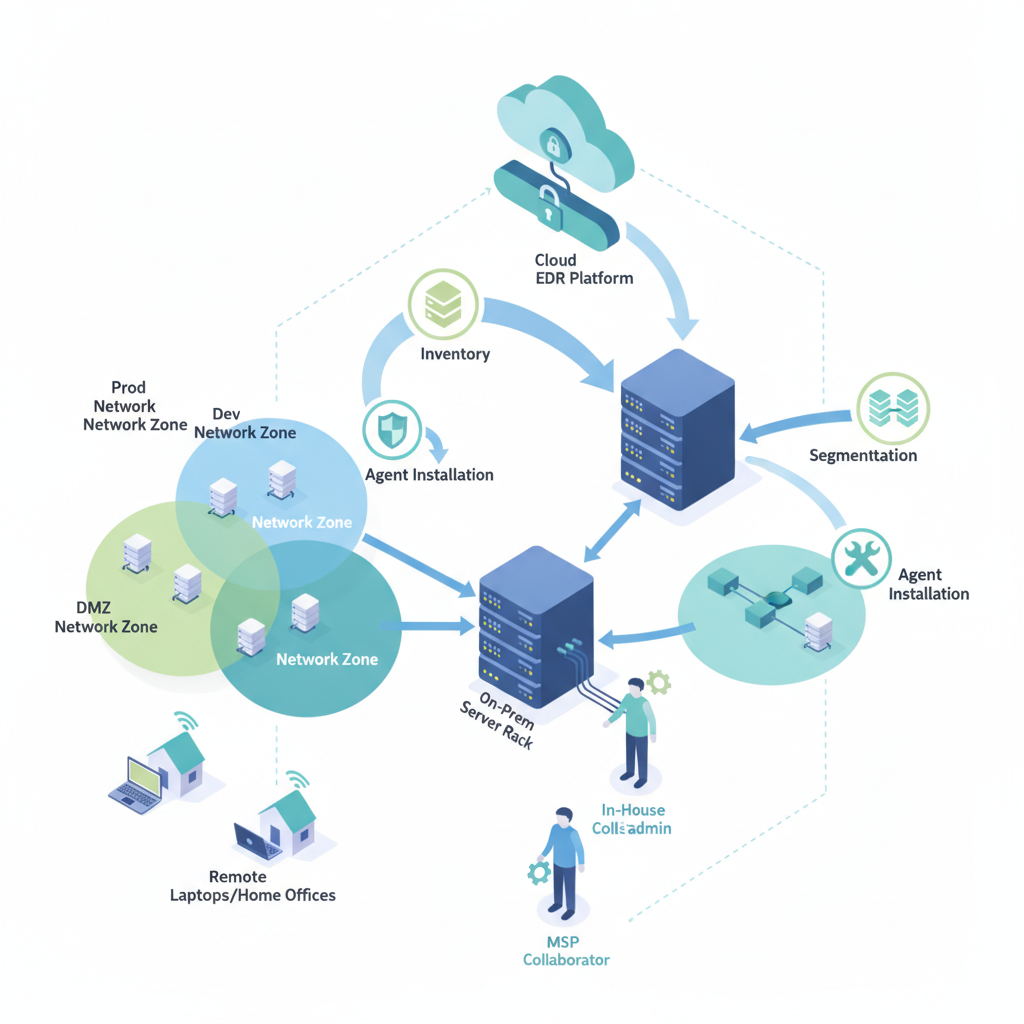
Make three strategic decisions before agent rollout: scope (which endpoints and OS versions), co‑management boundaries (what your MSP/MSSP monitors versus internal control), and the telemetry retention and SIEM forwarding policy. Decide whether remote endpoints (home users) will use VPN, split tunneling, or direct cloud reachback. These choices change onboarding scripts, exclusions, and network segmentation.
Example: a mid‑sized NJ healthcare practice might scope all clinical workstations and servers to full EDR, while putting shared printers and kiosks on a monitoring‑only policy. That decision drives licensing counts and installation packages.
Ownership & roles in co‑managed models
Define roles using a RACI table: who is responsible for installations, who approves policy changes, who is consulted on detections, and who must be informed for incidents. In practice, the external provider usually runs 24/7 detection and escalation, while the internal team owns device access, reimaging, and local remediation.
Actionable example: list three named contacts per role (engineer, compliance officer, executive sponsor), include phone/email, and add them to a shared runbook. This avoids the common “whose ticket is this?” delay during incidents.
Regulatory mapping (NYDFS, HIPAA, GLBA) and scope
Map each regulated requirement to an artifact: detection logging to NYDFS (23 NYCRR 500), access controls and audit trails to HIPAA, and risk assessments to GLBA. For each regulation, define required retention (e.g., log retention policies) and the report you'll produce during audit. Use local search phrases for visibility: "EDR deployment NJ", "co‑managed EDR NYC".
Quotable: "For regulated NJ & NY firms, EDR deployments should document ownership and detection SLAs to meet NYDFS and HIPAA evidence requirements." Capture these mappings as a one‑page matrix in your deployment runbook.
Step 1 — Inventory & endpoint prioritization
Start with a complete inventory: hostname, OS, user, location, and business criticality. Prioritize by business impact—billable workstation, clinical device, or contractor laptop—and by exposure: internet‑facing servers and remote users come first.
Concrete thresholds: consider onboarding high‑risk endpoints first (servers, admin workstations, VPN users), then standard laptops, then BYOD if supported. Build a CSV with columns: endpoint_id, owner, device_role, last_patch_date, AV present, and planned_install_date. That file becomes your rollout tracker and the first artifact auditors request.
Step 2 — Selecting an EDR agent and licensing model for co‑management
Choose an agent that supports centralized policy, offline telemetry caching for remote users, and APIs for SIEM/MDR integration. For co‑managed environments, pick a licensing model that allows role separation—administrative roles for your MSP/MSSP and restricted roles for your internal admins.
Example decision rule: if you need 24/7 managed detection, select licenses that include API access and allow delegated detection duties. Verify agent support for the exact OS versions in your inventory and confirm there’s a silent MSI/PKG install option for mass rollout.
Step 3 — Network segmentation and onboarding strategy (hybrid work considerations)
Network segmentation reduces lateral movement. Segment critical workloads, admin workstations, and guest networks. For hybrid users, require posture checks before granting access to sensitive VLANs and arrange fallback controls for remote devices that bypass corporate VPN.
Onboarding strategy: staged rollout by segment—start with test VLAN, then pilots in HQ, then remote users via cloud management. Use device posture scripts to enforce disk encryption and endpoint health before full agent activation.
Step 4 — Configuration baseline (detection, telemetry, exclusions)
Define a baseline policy that sets detection sensitivity, telemetry levels (process, file, DNS), and approved exclusions. Keep detection sensitivity high for admin and server tiers; tune down for large developer workstations that generate noisy alerts.
Concrete example settings: collect process creation, network connections, and file telemetry at minimum; retain 30 days of detailed telemetry in the EDR console and forward aggregated events to SIEM for 90 days (adjust per regulation). Document any exclusions and require change approvals for new exclusions.
Baseline configurations must be auditable and peer‑reviewed before pushing to production.

Step 5 — Integration prerequisites (SIEM, ticketing, MDR workflow)
Before rollout, validate integrations: API keys for SIEM ingestion, ticketing hooks for automatic incident creation, and MDR escalation channels. Define the alert-to-ticket mapping and set thresholds that avoid ticket storms.
Example workflow: a high‑confidence detection creates a high‑priority ticket in your ITSM system and notifies the on‑call analyst; medium alerts create a research task and are batched hourly. Document these rules and include sample tickets as runbook artifacts.
Step 6 — Agent rollout plan and rollback procedures
Create a phased rollout with clear rollback steps. Each phase should have a pilot group and success criteria (no more than X critical alerts, install success >95%). Define rollback: uninstall agent, revert policy, and reimage if rollback fails.
Make a rollback checklist: stop installs, escalate to engineering lead, run remediation scripts, and update the tracker. Capture common failure messages and fixes so teams don’t waste time rediscovering the same issues.
Step 7 — Testing detection & alerting (tabletop and live tests)
Run tabletop exercises first: walk through detection, ticketing, and escalation paths with stakeholders. Follow with controlled live tests—benign detections such as test process creation or EICAR file checks—recording results and time‑to‑ticket.
Measure outcomes: median time to ticket creation, median time to acknowledge, and median time to containment. Use those numbers to set practical SLAs between internal teams and your co‑managed partner.
Test detection playbooks at least quarterly and after any agent policy change.
Step 8 — Operational handoff: runbooks, escalation & on-call matrix
Handoff must include runbooks for common detections, escalation matrices with 24/7 contacts, and a documented on‑call rotation. Provide screenshots of the EDR console, sample tickets, and exact API endpoints for integrations.
Actionable artifact: attach a 1‑page quick reference for on‑call staff that lists the top five alerts, immediate containment steps, and who to call next. Keep this page in an accessible shared folder and version it with a changelog.
Step 9 — Compliance evidence & documentation for audits
Prepare evidence bundles: inventory CSV, RACI, policy snapshot, detection test logs, integration screenshots, and change approvals. For NYDFS (23 NYCRR 500) and HIPAA, auditors expect documented ownership and detection timelines.
Example checklist for audits: include export of policy settings, SIEM ingestion proof, and incident tickets for at least one simulated detection. Keep these artifacts for the regulated retention period and note where each artifact is stored.
Step 10 — Continuous improvement: update cadence and patching
Set a cadence for policy reviews, agent updates, and patching. A practical cadence: monthly policy review, quarterly tabletop tests, and agent updates as released by the vendor after a staging window. Track patch compliance in your inventory and force remediation for outliers.
Decision rule: if an agent patch causes >5% install failures in pilot, pause and escalate. Otherwise proceed to phased production rollout. Capture lessons learned and update runbooks after each change.
Deployment checklist PDF / downloadable runbook
Produce a single downloadable runbook that contains: a one‑page summary, the inventory CSV, RACI table, integration details, and the rollback checklist. Include a printable one‑page, step‑by‑step installer checklist for field technicians.
Artifact example (copy to your runbook): an ordered checklist with installation steps, verification commands, and post‑install tests. Keep the runbook versioned and timestamped so auditors can see the history of changes.
Common pitfalls in NJ & NY deployments and how to avoid them
Frequent pitfalls: unclear co‑management boundaries, insufficient telemetry for SIEM correlation, and failing to plan for remote users. Avoid these by documenting who owns each task, forwarding rich telemetry to SIEM, and testing agent behavior on common home‑ISP networks.
Local friction: NY healthcare and financial firms often need tighter retention windows and documented evidence; align your retention policy to regulatory minimums and record every policy change with an approval signature.
Conclusion and next steps (free assessment call)
Use this edr deployment checklist hybrid co‑managed guide to create a reproducible, auditable deployment across NJ & NY. If you need implementation help, Eighty Seven Solutions offers 24/7 monitoring and senior‑engineer‑led support as part of its Services, which can assist with pilot deployments and runbook creation, including insights on how to deploy EDR and build a threat hunting program.
Next steps: assemble your inventory, choose an agent that supports co‑managed roles, and schedule a tabletop exercise. To discuss implementation options or a free assessment, review our our services page or our services demo. For direct contact, use the contact us page, contact us, or contact us to arrange a consultation.
FAQ
What is edr deployment checklist for hybrid & co‑managed it in nj & ny? An edr deployment checklist hybrid co‑managed approach is a documented plan that lists inventory, roles, policies, integration points, test cases, and audit artifacts required to deploy EDR across mixed on‑site and remote environments in NJ and NY.
How does edr deployment checklist for hybrid & co‑managed it in nj & ny work? The checklist works by forcing decisions before rollout: scoping endpoints, defining ownership, configuring telemetry and exclusions, integrating with SIEM and ticketing, testing detections, and storing compliance evidence for regulations like 23 NYCRR 500 and HIPAA.