

TL;DR
- Problem: Hybrid teams and co‑managed relationships often leave blind spots on remote endpoints and SaaS-connected systems. Quick answer: start with a small pilot of high‑risk endpoints, validate telemetry ingestion into your SIEM, then expand in controlled phases while operationalizing a threat hunting cadence.
- Quotable line: "Start with a pilot of high‑risk endpoints (finance, PHI/PII owners) and integrate EDR telemetry into your SIEM within 30 days."

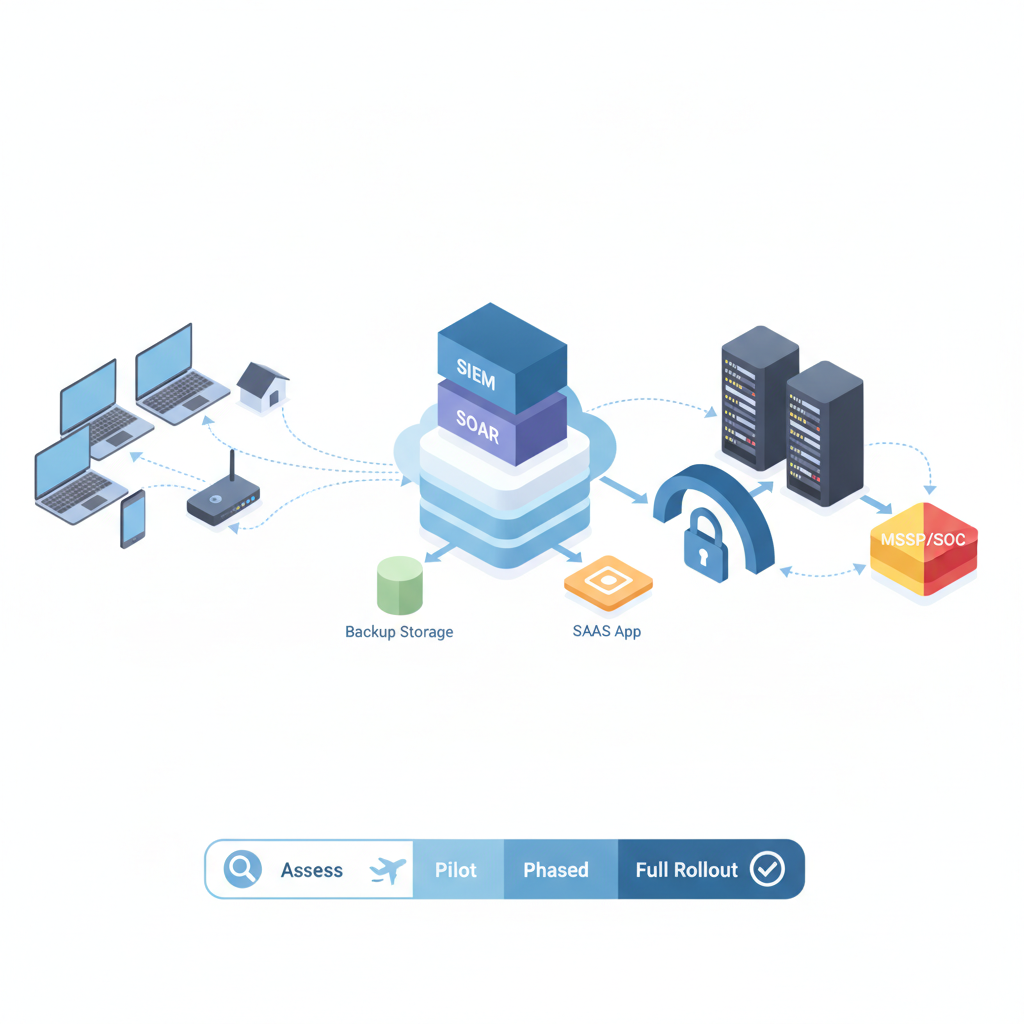
Introduction — deployment scenarios for hybrid and co‑managed IT teams
You manage hybrid teams across New Jersey and New York and you keep seeing the same gap: remote laptops, contractor machines, and cloud‑hosted apps aren't producing consistent endpoint telemetry. That gap hides lateral movement and makes regulatory reporting for NYDFS 23 NYCRR 500 and HIPAA tougher during audits. The solution is to deploy EDR thoughtfully and pair it with an operational threat hunting program tailored to hybrid and co‑managed environments.
Quick answer: plan a pilot that covers high‑risk endpoints, verify agent compatibility, ensure telemetry flows to your SIEM, and codify escalation and SLA language for co‑managed responsibilities. This article walks through an actionable, platform-specific approach you can apply right now in NJ & NY.
Prioritize telemetry collection before prevention: you can't hunt what you don't log.
Who this is for: IT owners, security engineers, and managers running mixed on‑prem/cloud infrastructure, or those working with an MSP/MSSP co‑managed relationship in NJ & NY. The remainder of this post follows a stepwise roadmap: assess, choose a model, prepare, install, integrate, operate, and iterate.
Assessing your environment: asset inventory, OS mix, remote endpoints, and SaaS dependencies
Start with a firm inventory. Without an accurate asset list you’ll deploy agents to the wrong targets, miss servers that store PHI, or fail to track contractor devices. Practical first steps: query your MDM/AD/Intune inventory, export a CSV of active endpoints, and reconcile that list against cloud identity providers (Azure AD, Google Workspace) and key SaaS apps that hold regulated data.
Concrete example: export device lists from Intune and Active Directory, then merge by hostname and user to create a single master inventory. Add three fields: owner, risk profile (finance, HR, clinical), and remote frequency (days/week remote). That lets you prioritize rollout to finance and PHI/PII owners first.
OS mix matters for agent selection and compatibility. Record counts for Windows (versions), macOS (versions), Linux distributions, and mobile OS if relevant. EDR agents vary in kernel drivers and syscalls; older Windows 7/8 endpoints often need different install packages or isolated rollout plans. Gather a sample of at least 20 endpoints from each OS family and validate agent installs in a lab image before broad distribution.
SaaS dependencies create blind spots. Inventory which SaaS platforms (EHR, payroll, CRM) connect to local endpoints or sync files. For each SaaS app mark whether it exports logs and whether it supports log forwarding or API access; when it does, plan to integrate those logs with your SIEM in phase two.
Regulatory mapping: for NYDFS 23 NYCRR 500 and HIPAA, identify owners of regulated data and tag those endpoints. Create a minimal compliance rule: any device that accesses PHI or financial systems must run a monitored EDR agent and be in the SIEM within 30 days of agent deployment.
Quotable fact: "An accurate asset inventory includes owner, risk profile, and remote frequency for every endpoint."
Choosing a deployment model: in-house, co‑managed with an MSP/MSSP, or fully managed
Decide who owns which wheel. There are three realistic models for organizations in NJ & NY: (1) in‑house managed (your team owns installation, tuning, and response), (2) co‑managed with an MSP/MSSP (you share detection, incident handling, and policy decisions), or (3) fully managed (vendor handles everything). For regulated firms—finance and healthcare—co‑managed often balances internal control with external expertise.
Example decision rule: if you have fewer than two full‑time security engineers, choose co‑managed with an MSSP; if you have a SOC team and a mature SIEM, consider in‑house. Co‑management in practice means the MSP/MSSP runs 24/7 monitoring and alert triage while your internal team handles privileged access, compliance approvals, and business context.
When selecting co‑managed partners, use these evaluation criteria as a decision matrix: support for your EDR vendor, visibility into telemetry, access controls for multi‑tenant consoles, and contractual SLA & escalation specifics. Put those criteria into a scoring table and prioritize vendors that already support co‑management workloads (for example, platforms documented by Microsoft for Configuration Manager co‑management when using Intune).
Co‑management is a responsibility matrix, not a relay race; define each owner explicitly.
For NJ & NY businesses, include local considerations: remote worker density is higher in suburban NJ and NYC metro zones, and common verticals are finance and healthcare. If you plan co‑management with a local MSSP, add a clause in contracts requiring access to raw telemetry for audits and incident investigations to meet NYDFS reporting requirements.
Pre-deployment checklist (network readiness, EDR agent compatibility, licensing, change management)
Before you hit install, run this edr deployment checklist so installs don't create outages. Key items:
- Network readiness: ensure outbound connectivity to EDR cloud endpoints; whitelist necessary domains and ports on proxys and firewalls.
- Agent compatibility: test installers on representative endpoints and collect installer error logs for common failure signatures.
- Licensing: map device counts to license seats and purchase a 10% buffer for contractors and spares.
- Change management: schedule installs in maintenance windows; publish rollback steps and a clear owner list.
Step‑by‑step example: 1) Run a pilot installer on 10 finance and 10 remote worker devices; 2) Confirm each device sends events to the management console; 3) Validate SIEM ingestion for the pilot; 4) Schedule phased rollout by department.
Include compliance checks: for NYDFS and HIPAA, verify that EDR agents are configured to collect process creation, network connections, and file activity; document retention policies and ensure logs are accessible for regulatory reporting. Add this quotable implementation line to your runbook: "Start with a pilot of high‑risk endpoints (finance, PHI/PII owners) and integrate EDR telemetry into your SIEM within 30 days."
Installation & rollout strategy — pilot, phased, full deployment
Adopt a three‑phase rollout: pilot, phased expansion, and full deployment. The pilot should target 20–50 endpoints representing the highest risk: finance, HR, IT admins, and servers that host PHI. Use the pilot to validate agent stability, telemetry fidelity, and operational processes like alert triage and isolation.
Pilot checklist: verify agent auto‑update behavior, confirm exclusion policies don't hide malicious behavior, and test uninstall protection. During the pilot, collect these artifacts: install logs, endpoint resource usage snapshots (CPU and memory during agent peak), and SIEM event counts for baseline comparison.
For phased rollout, group endpoints by department and risk. Roll out to one group per week or per maintenance window depending on change management capacity. Maintain a rollback playbook that lists exact steps: how to stop the agent service, remove the agent, and restore previous configurations. Document expected side effects like temporary CPU spikes or network bursts during initial scan periods.
Full deployment means all managed endpoints run the agent and are onboarded into monitoring playbooks. Do not mark the project complete until you’ve confirmed: cross‑platform visibility, SIEM correlation rules are firing correctly, and escalation paths are verified with a live drill.
Best practices for patching, exclusions, and performance tuning
EDR configuration best practices reduce noise and prevent outages. For patching, keep agents updated within one maintenance cycle of vendor releases. Test updates in the pilot group first. For exclusions, document them in a centralized policy and limit them to signed software or clearly justified paths; every exclusion must include an approver and a review date.
Performance tuning targets: typical endpoints should see negligible CPU use from the agent at idle; if you observe sustained >10% CPU attributable to the agent, investigate CPU‑heavy modules (real‑time scanning or deep file inspection). For disk and network, aim for the agent's initial scan to complete within off‑hours to avoid business hours impact.
Operational tips: use policy groups for different device classes (servers, laptops, contractors) so you can tune sensitivity without creating policy conflicts. Keep a short list of known good exclusions and automate periodic review. Finally, log and track all changes through your change management system so you can revert configurations that increase false positives.
Integrating EDR telemetry with SIEM/SOAR and backup solutions
EDR is only useful when its telemetry is actionable. Forwarding events into the SIEM allows correlation with logs from firewalls, VPNs, identity providers, and backups. Start by mapping the EDR event schema into your SIEM: process_create, network_connection, file_write, and threat_detection events should each have a clear ingestion path and schema mapping.
Practical example: create a parser for process_create events and normalize the fields for username, process_hash, parent_process, and command_line. Once parsed, write correlation rules that alert when a process with a rare parent spawns a binary downloaded in the last 24 hours and the endpoint has not recently patched—this ties EDR data to patch management and threat intelligence.
Backup integration matters for ransomware response. Ensure your backup solution tags backups with endpoint IDs and timestamps, and record backup health in the SIEM. If the SIEM sees mass file encryption patterns, trigger an automated playbook that isolates affected endpoints and notifies backup recovery owners.
Quotable sentence: "Integrate EDR telemetry with SIEM and backups so detection immediately informs containment and recovery steps."
Building and operationalizing a threat hunting program (roles, cadence, tooling)
Threat hunting turns passive detection into proactive discovery. Start by defining roles: owner (senior security lead), hunters (analysts), and SME feeders (IT, app owners). Hunters need scheduled time—at least one day per sprint—to investigate hypotheses and refine detection rules.
Tooling: use the EDR console for endpoint queries, the SIEM for cross‑source correlation, and a notebook or threat hunting platform to capture hypotheses, findings, and artifacts. Base hunts on MITRE ATT&CK techniques—pick TTPs relevant to your vertical. For healthcare, focus hunts on credential theft and exfiltration patterns; for finance, emphasize living‑off‑the‑land techniques and unauthorized access.
Cadence example: run a weekly low‑effort hunt for anomalous process execution and a monthly deep hunt focused on lateral movement. Each hunt produces an artifact: a detection rule, a playbook adjustment, or an IOA (indicator of attack) to distribute. Document a triage severity scale and ensure each finding includes contextual business impact—what assets would be affected and whether HIPAA/NYDFS reporting thresholds are met.
Creating runbooks and playbooks for common incidents (ransomware, suspicious lateral movement)
Runbooks convert detection into repeatable actions. For ransomware, create a step sequence: isolate endpoint, take forensic image, capture running processes and network connections, forward indicators to the SIEM, and notify legal/compliance if PHI or regulated systems are impacted. Include exact console actions for your EDR vendor (example: how to toggle isolation and collect artifacts).
For suspicious lateral movement, include commands to query SMB sessions, recent RDP logs, and create temporary network segmentation. Every runbook must list decision points and required approvals—who can authorize system isolation, who owns forensic artifacts, and who communicates with stakeholders.
Make playbooks consumable: one page for first responders with rapid steps, and a detailed annex for forensic teams. Ensure playbooks reference the co‑managed responsibilities so both your internal team and the MSP/MSSP know their tasks.
Testing and tabletop exercises for hybrid teams
Testing validates that roles, tools, and playbooks work under pressure. Schedule quarterly tabletop exercises that include remote staff and co‑managed partners. Use realistic scenarios: a phishing compromise that escalates to credential misuse, or a ransomware event on an executive's laptop with access to PHI.
Exercise checklist: predefine the scope, invite stakeholders (IT, security, legal, HR), run a 60–90 minute tabletop, and record decisions and failure points. After the exercise, produce an action log and track remediation items in your ticketing system. Repeat the exercise until all high‑risk failure points are closed.
SLA & escalation design for co‑managed EDR (who owns what?)
SLA language in co‑managed contracts must be explicit about responsibilities. Rather than inventing numbers, use templated clauses with placeholders for your organization. Example clause pattern: "MSSP will monitor EDR alerts and perform initial triage; the client maintains ownership of privileged remediation actions and final approval for containment. Response priority, notification procedures, and escalation contacts will be documented in Appendix A."
Include these elements in Appendix A: alert prioritization matrix, primary and secondary contacts for both parties, and an escalation ladder for unresolved incidents. For NYDFS and HIPAA compliance, require the MSSP to provide timely access to raw telemetry and a timeline of investigative actions to support regulatory reporting.
Decision matrix example (table): which party performs each task (monitoring, triage, containment, forensic imaging, regulatory reporting) and the handoff trigger between them. This removes ambiguity during incidents and keeps both parties accountable.
Training and change management for staff and remote workers
EDR success depends on people. Train staff on why agents exist, what alerts mean, and how to respond to isolation requests. For remote workers, publish simple steps for connectivity issues (how to check that the agent is running, how to upload logs if asked, and how to reach the helpdesk).
Training program example: 30‑minute sessions for end users covering agent behavior and a 2‑hour technical workshop for IT and security staff covering agent deployment, debugging common errors, and forensic artifact collection. Record all sessions and keep a short FAQ for common support tickets.
Post-deployment tuning, reporting, and continuous improvement checklist
After full deployment, perform a 30/60/90 day review. The post-deployment checklist should include: false positive reduction, detection coverage gaps, policy group adjustments, and SIEM rule tuning. Track KPI examples such as mean time to detect (MTTD) and mean time to respond (MTTR) as typical operational metrics; define your target ranges based on internal capacity.
Continuous improvement: schedule monthly threat hunting retrospectives and quarterly architecture reviews. Maintain a living change log of rule changes, exclusions approved, and agent updates so auditors can trace configuration drift during a compliance review for NYDFS or HIPAA.
Quick checklist & downloadable implementation template
Use this compact edr deployment checklist and decision matrix to jumpstart your project. Copy it into your change management system and adapt as needed.
- Inventory: consolidated CSV with owner, risk profile, remote frequency
- Pilot: 20–50 high‑risk endpoints validated for telemetry
- SIEM integration: parser and at least 5 correlation rules
- Runbooks: ransomware and lateral movement first responder playbooks
- Co‑management: signed responsibility matrix and appendix with escalation contacts
| Decision | In‑House | MSSP/Co‑managed |
|---|---|---|
| 24/7 monitoring | No | Yes |
| Initial triage | Shared | Primary |
| Containment / isolation | Client approval | Execution on approval |
| Forensic imaging | Client | Support |
Decision rule example: if an alert affects PHI or financial systems, automatically escalate to the highest severity and notify compliance—this triggers regulatory timelines under NYDFS and HIPAA.
Local resources & next steps — free assessment CTA
If you want a local partner that understands NJ & NY regulatory needs and hybrid workforce patterns, consider reviewing available managed IT & cybersecurity engagements. For more information on services that include 24/7 monitoring and senior engineer support, learn about our services or book a technical demo at our services. To schedule a free IT assessment or initiate a co‑managed conversation, please contact us, visit our contact us page, or use the contact us form.
FAQ
What does it mean to deploy edr and build a threat hunting program for hybrid & co? Deploying EDR means installing and configuring endpoint agents across on‑prem and remote devices, ensuring telemetry is forwarded to a central monitoring platform, and building a threat hunting program that proactively searches that telemetry for compromise indicators. Threat hunting operationalizes detections with defined roles, regular cadence, and documented playbooks.
How do you deploy edr and build a threat hunting program for hybrid & co? Deploy EDR by first inventorying assets and piloting agents on high‑risk endpoints, integrate telemetry with your SIEM, create runbooks for common incidents, formalize a co‑managed SLA and escalation matrix, then schedule recurring threat hunts and tabletop exercises to validate the program.